
Planned maintenance
Our My Council Services platform will be having planned maintenance. This will affect our online portal and all forms, including payment forms.
This is planned for the morning of Saturday 24 October 2026, from 3:30am to 5:30am.
The system will be unavailable during the maintenance period. If you are unable to access the platform, please try again later.
How our forms are changing
We've updated how you access some of our council services, which may change how some online forms look.
We’ve also taken extra steps to protect your personal information.
Forms now include multifactor authentication. This additional security feature helps to protect your account, by preventing anyone else from logging in to it.
When you log in to our forms, after entering your email and password, we will send you a security code:
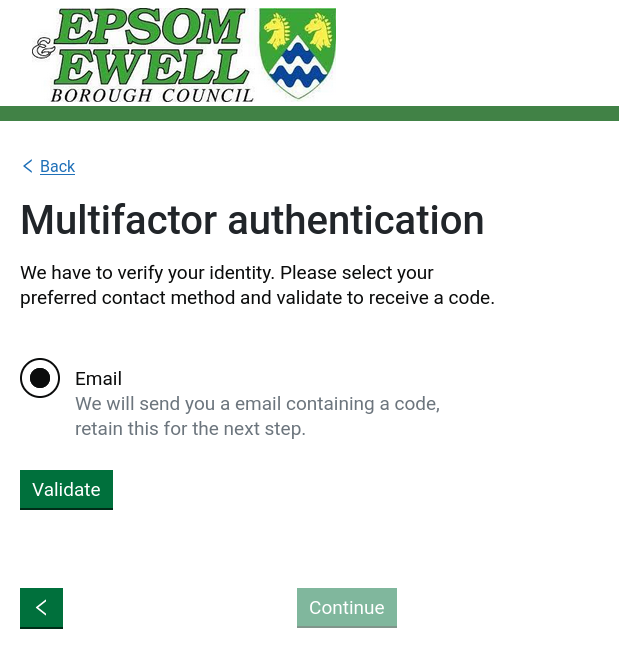
You can choose whether to receive the code by email or, if you have provided your phone number, by text message or phone call.
The email will be sent to you from: noreply@epsom-ewell.gov.uk
It will be addressed to the name on your account and will tell you your 4-digit one-time password (OTP):
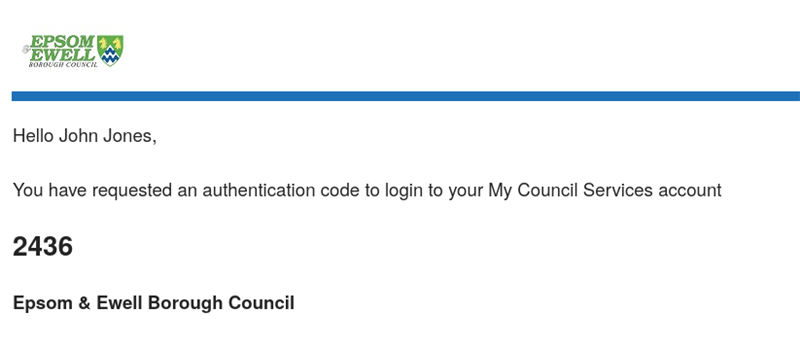
Please enter the code provided on the login screen to proceed. If you do not receive the email, please check your spam folder.
The code will be valid for 24 hours. After this time, you will need to request a new code.
If you have any difficulties, please contact us:
- by email at contactus@epsom-ewell.gov.uk
- by phone on 01372 732000.
- if you are hard of hearing, you can SMS on 07950 080 202.